Comic Neue!


For those who can’t stand the sight of Comic Sans, say hello to Comic Neue.
Screen Shot 2014 04 07 at 4.45.42 pm 730x339 Hate Comic Sans? Maybe youll find Comic Neue more appealingDeveloped by Craig Rozynski, an Australian graphic designer in Japan, Comic Neue is a new take on the oft-criticized Comic Sans font. “The squashed, wonky and weird glyphs of Comic Sans have been beaten into shape while maintaining the honesty that made Comic Sans so popular,” a description for the new font states.
You can now download Comic Neue on its site, free for a limited time. Rozynski has noted though on Twitter that he isn’t sure if he wants to start selling Comic Neue or not. The font could do well, given that he has managed to actually adopt the good parts of Comic Sans and give the font a refreshed look that actually looks appealing (and very usable).

Perfect Lenght on Internet


Every so often when I’m tweeting or emailing, I’ll think: Should I really be writing so much?
I tend to get carried away. And for the times that I do, it sure would be nice to know if all this extra typing is hurting or helping my cause. I want to stand out on social media, but I want to do it in the right way.
Curious, I dug around and found some answers for the ideal lengths of tweets and titles and everything in between. Many of these could have been answered with “it depends,” but where’s the fun in that?
Solid research exists to show the value of writing, tweeting, and posting at certain lengths. We can learn a lot from scientific social media guidelines like these. Here’s the best of what I found.

The ideal length of a tweet is 100 characters

Whom should you trust when it comes to advice on the ideal length of a tweet? How about Twitter itself?
Twitter’s best practices reference research by Buddy Media about tweet length: 100 characters is the engagement sweet spot for a tweet. 
Creativity loves constraints and simplicity is at our core. Tweets are limited to 140 characters so they can be consumed easily anywhere, even via mobile text messages. There’s no magical length for a Tweet, but a recent report by Buddy Media revealed that Tweets shorter than 100 characters get a 17% higher engagement rate.
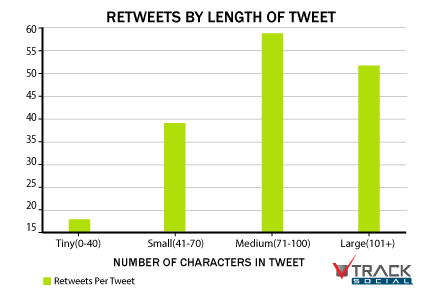
The Buddy Media research falls in line with similar research by Track Social in a study of 100 well-known brands that are popular on Twitter. Track Social also found that the perfect Tweet length was right around 100 characters.
tweetlength102912sk The ideal length for everything on the InternetTheir analysis saw a spike in retweets among those in the 71-100 character range—so-called “medium” length tweets. These medium tweets have enough characters for the original poster to say something of value and for the person retweeting to add commentary as well.

The ideal length of a Facebook post is less than 40 characters

Forty characters is not much at all. (The sentence I just wrote is 35 characters.)
Keep Facebook posts short 730x515 The ideal length for everything on the InternetBut 40 is the magic number that Jeff Bullas found was most effective in his study of retail brands on Facebook. He measured engagement of posts, defined by “like” rate and comment rate, and the ultra-short 40-character posts received 86 percent higher engagement than others.
The 40-character group also represented the smallest statistical set in the study (only 5 percent of all posts qualified at this length), so best practices on Facebook also include the next most popular set: Posts with 80 characters or fewer received 66 percent higher engagement.
Many different studies over the years have confirmed that shorter posts are better on Facebook. One such study by BlitzLocal looked at nearly 120 billion Facebook impressions and found that performance tailed off as posts grew longer. Their particular data found significant advantages to question posts between 100 to 119 characters.

The ideal length of a Google+ headline is less than 60 characters

To maximize the readability and appearance of your posts on Google+, you may want to keep your text on one line. Demian Farnworth of Copyblogger studied the Google+ breaking point and found that headlines should not exceed 60 characters.
Pic1 The ideal length for everything on the InternetHere is an example of what we mean. The post below had a headline exceeding 60 characters and got bumped.
Screen shot 2014 03 27 at 8.02.15 PM The ideal length for everything on the Internet
This post kept the title within 60 characters and stayed on one line.
Screen shot 2014 03 27 at 8.02.24 PM The ideal length for everything on the Internet
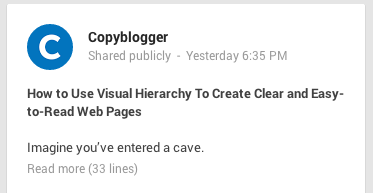
Demian’s advice goes even deeper. If your Google+ headline simply can’t be contained in one line, then you can turn to Plan B. Write a superb first sentence.
In the last update, Google changed the layout of posts so that you only see three lines of the original post before you see “Read more” link. In other words, your first sentence has to be a gripping teaser to get people to click “Read More.”
Here is Demian’s killer example:
20130826 4 The ideal length for everything on the Internet
In terms of overall post length, Google+ posts average 156 characters, according to Qunitly Research. Digging further, Quintly found the largest spike in engagement at posts of 5 characters in length and the second-highest spike in posts of 442 characters. Takeaway: You can write a lot longer on Google+ and still find great results.

The ideal length of a headline is 6 words

How much of the headline for this story did you read before you clicked?
According to a post by KISSmetrics, you might not have read it all.
Writing for KISSmetrics, headline expert Bnonn cites usability research revealing we don’t only scan body copy, we also scan headlines. As such, we tend to absorb only the first three words and the last three words of a headline. If you want to maximize the chance that your entire headline gets read, keep your headline to six words.
Of course, six-word headlines are rare (and hard to write!). If you can’t cut your title down to six words, you can still be aware of how your headline might be read, and you can adjust accordingly. As the KISSmetrics post says:
Of course, that’s seldom enough to tilt the specificity-meter into the red. And I have it on good authority that some of the highest-converting headlines on the web are as long as 30 words. As a rule, if it won’t fit in a tweet it’s too long. But let me suggest that rather than worrying about length you should worry about making every word count. Especially the first and last 3.

The ideal length of a blog post is 7 minutes, 1,600 words

When measuring the content that performs best on their site, Medium focuses not on clicks but on attention. How long do readers stick with an article?
In this sense, an ideal blog post would be one that people read. And Medium’s research on this front says that the ideal blog post is seven minutes long.
To arrive at this number, Medium measured the average total seconds spent on each post and compared this to the post length. All Medium posts are marked with a time signature for how long the read should be.
1 6nX PYNpn0Ajc0tardzIkg The ideal length for everything on the InternetAfter adjusting their analysis for a glut of shorter posts (overall, 74% of posts are under 3 minutes long and 94% are under 6 minutes long), they came to their conclusion:
And there we have it: the average total seconds rises for longer posts, peaks at 7 minutes, and then declines.
And in terms of word count, a 7-minute read comes in around 1,600 words.
(A photo-heavy post could bring the average down closer to 1,000. Medium’s seven-minute story on ideal post length was filled with images and graphs and contained 980 words.)
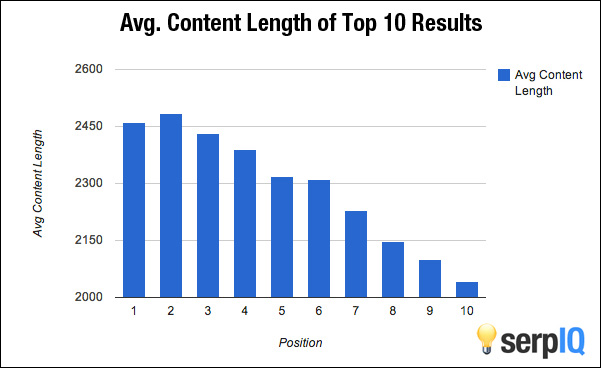
SerpIQ examined the question of ideal post length from an SEO perspective. They looked at the top 10 results on search results pages and counted the words in each article. Their data included text in the sidebars of posts, so you can knock a few words off of the totals below.
Of course, as with any of these ideal lengths, the answers you find here could very well be taken as “it depends,” since research varies from site to site.
9k1dK The ideal length for everything on the InternetFor instance, Moz found that longer posts on their blog get linked to more often, and Upworthy found little correlation between length and attention when they tested Medium’s hypothesis for themselves. (Upworthy cited factors like type of posts and audience as a couple of possible explanations for the discrepancy.)
Perhaps the best takeaway here is this, borrowed from the conclusion of Medium’s study:
What it does mean is that it’s worth writing however much you really need. Don’t feel constrained by presumed short attention spans. If you put in the effort, so will your audience.

The ideal width of a paragraph is 40-55 characters

I know, I know. Width and length aren’t the same thing, but I just couldn’t resist this interesting take. Social media expert Derek Halpern found that there are a pair of very important, underlying factors that go into the width of your content:
  • Content width can give the appearance of simplicity or complexity
  • Content width is key to maximizing reader comprehension
The ideal paragraph length, in this sense, would appear simple to the reader and allow for easy reading. Halpern believes he found the window where this happens.
The problem is, to ensure maximum comprehension and the appearance of simplicity, the perfect line length ranges between 40 and 55 characters per line, or in other words, a content column that varies between 250-350 pixels wide (it depends on font size and choice).
Forty and 55 characters per line means about 8 to 11 words. If you’re viewing the Buffer blog in a desktop browser, you’re likely seeing up to 20 characters per line. Whoops!
You may have noticed many sites online that have a different font for their lead paragraph than they do for the remainder of their text. Would you believe there is psychology at play here?
Consider that shorter lines appear as less work for the reader; they make it easier to focus and to jump quickly from one line to the next. Opening paragraphs with larger fonts—and therefore fewer characters per line—are like a a running start to reading a piece of content. This style gets readers hooked with an easy-to-read opening paragraph, then you can adjust the line width from there.

Android KitKat new mobile


Last week, Samsung showed offthe Galaxy Ace Style, a mid-range smartphone running Android KitKat, and today the device was formally announced by the company.
Ace Style Black 1 Samsung announces the Galaxy Ace Style, a mid range smartphone running Android KitKatThe Galaxy Ace Style looks like your typical Samsung device, but it appears targeted at those shopping on a more modest budget. It features a four-inch display, 1.2GHz dual core processor, 4GB of internal memory and runs Samsung’s TouchWiz skin. Most interestingly, it is one of the few mid-range phones that comes with the latest version of Android — 4.4, aka KitKat — out of the box.
There’s a five megapixel camera on the back, while the front-facing camera is a VGA. As you’d expect, it supports MicroSD cards to allow users to expand the on-device memory.
Galaxy Ace Style Product Specifications 730x737 Samsung announces the Galaxy Ace Style, a mid range smartphone running Android KitKatSamsung hasn’t released a price for the device — reports suggestit will be between $275-$410 – but it’s clear it is aimed at mid-range shoppers since Samsung says it is “designed to support and power young social consumers.”
The phone will be available worldwide “beginning in April” — which presumably means now — and it is available in ‘Cream White’ and ‘Dark Gray’.
Headline image via sweetlabs / Flickr

Windows XP :(


Microsoft’s support for two major products ends today: Windows XP and Office 2003. As a result, the company will no longer release security updates for either of the two, and it recommends users who still use either to get a newer version. Details on the last handful of updates is here.
If you’re wondering why April 8, 2014 is the date support for both of these products ends, it’s really quite simple. Microsoft releases regular patches on Patch Tuesday, the second Tuesday of every month.
Microsoft supports its products for many years, and depending on when service packs as well as successors are released, the company eventually announces, in advance, when it will cut off support. April 8 happens to be the last Patch Tuesday for both products, meaning if security holes are found after today’s date, they won’t be plugged.

Windows XP

Windows XP was released on October 25, 2001. It received three major updates: Service Pack 1 (on September 9, 2002), Service Pack 2 (on August 25, 2004), and Service Pack 3 (April 21, 2008).
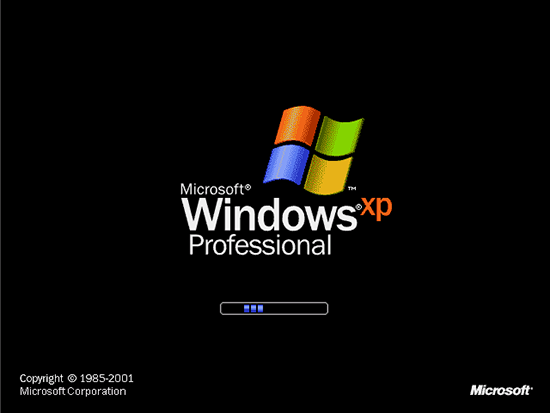
windows xp boot Microsoft ends support for Windows XP and Office 2003On April 14, 2009, Microsoft retired Mainstream Support for XP, meaning security updates were still available but free technical support, warranty claims, and design changes stopped being offered. The company today retired Extended Support for the operating system.
There is one small piece of the puzzle left. Microsoft has said it will continue to update its security products for XP until July 14, 2015, but they will regularly warn users that the operating system itself is no longer secure.
xpbliss Microsoft ends support for Windows XP and Office 2003Many of Microsoft’s products have a support life cycle of only 10 years, so XP is actually unique in that it was supported for more than 12 years. This was done as a result of XP’s massive userbase; the latest numbers show it still has over 27 percent market share.
If you’re still using XP, no more security updates for your machine means you should upgrade to a newer version, be it Windows Vista, Windows 7, or Windows 8. You can also get a new Windows computer altogether, which should be running the latest Windows 8.1 release.
Alternatively, you can choose to use a different operating system, such as one of the many Linux variants, or even purchase a new computer running OS X or Chrome OS. If you prefer mobile operating systems as a replacement to your machine, Android, iOS, Windows Phone, and BlackBerry OS are all viable options, but you’ll naturally have to buy a new device.
Regardless of what you chose, we highly recommend getting the latest version, as it means you’ll be supported for longer. Chances are if you, or someone you know, is still on Windows XP, using the hardware and software combination for as long as possible is clearly important. As such, if you’re finally upgrading, make a point to get the latest and greatest.
image Microsoft ends support for Windows XP and Office 2003To be clear, Windows XP will continue to work after today. Yet the ancient operating system is horribly outdated, and for years now has been very insecure. After today, continuing to use it is simply a very, very poor choice.

Internet Explorer 8

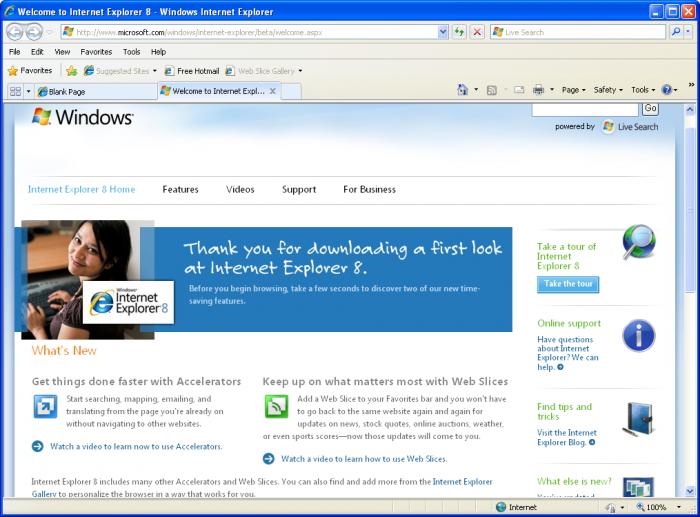
Internet Explorer 8 was released on March 19, 2009. It the default browser for Windows 7 and Windows Server 2008 R2, but was also released for Windows XP, Windows Server 2003, Windows Vista, and Windows Server 2008.
While IE8 is scheduled to receive extended support until January 14, 2020, it dies today for Windows XP. Here’s an official statement TNW obtained from the Windows team:
internet explorer 33 Microsoft ends support for Windows XP and Office 2003Internet Explorer follows the support lifecycle of the Windows operating system on which it is installed. This means users on Internet Explorer 6, 7 and 8 on Windows XP will also end support. We encourage you to upgrade to a modern OS like Windows 7 or Windows 8/8.1 to receive the full security and performance benefits of a modern browser like IE10 and IE11.
As Windows XP beings to die a slow death, so will IE8 and its predecessors. This is excellent news, given that XP users can’t upgrade past IE8: it is the latest version of Internet Explorer that can run on the ancient OS. This has allowed it to remain the most popular browser version for years (last month’s figures give it a market share of 21.14 percent).
If you absolutely insist on using Windows XP, Google announceda few months ago that it will support Chrome on the platform until April 2015. This means Chrome is a slightly more viable option than IE8 on Windows XP for the next year or so, but we wouldn’t recommend it: getting off Windows XP should be everyone’s top priority, regardless of which browser you choose, now that the OS itself is no longer being updated.

Office 2003

Office 2003 was released on October 21, 2003. It received three major updates: Service Pack 1 (on July 27, 2004), Service Pack 2 (on September 27, 2005), and Service Pack 3 (September 17, 2007).
On April 14, 2009, Microsoft retired Mainstream Support for Office 2003, meaning security updates were still available but free technical support, warranty claims, and design changes stopped being offered. The company today retired Extended Support for the office suite.
199290 Microsoft ends support for Windows XP and Office 2003Much like running a combination of Windows XP and Internet Explorer 8 is extremely unwise, so is running Windows XP and Office 2003. Now that Office 2003′s support has also ended, Microsoft is pushing users to get Office 365.
Geoff Anderson, Microsoft’s group product manager for Office 365 for SMBs, emphasized that instead of paying a high upfront cost, businesses should consider the low upfront cost of an Office 365 subscription. He added that the cloud offering was a “low friction way to get all this new technology, and get much more capability than was possible before.”
Microsoft’s main concern is to convince individuals and businesses to purchase its office cloud suite offering, which will naturally help the company’s bottom line. The more important reason, and here Anderson and TNW are in agreement, is all about security.
Whether you get Office 2013, Office 365, or another office suite entirely, the point is to get off the old software. That’s the broader message today: if you’re still using Windows XP, IE8, or Office 2003, it’s time to move on.
newer post older post